Now on the App Store

Mileage tracking
built for K-12 educators and staff.

Automatically log every reimbursable mile between school sites. Built for the way district reimbursement actually works — IRS rates, multi-district support, approved distances, and audit-ready reports.

Free for 30 trips or 35 days · No commitment · Cancel anytime

Made for educators and school staff who drive

If you drive between schools, the district office, or student homes — your mileage is reimbursable.

Itinerant teachers. Special education staff. Coaches splitting time across campuses. Administrators making the rounds. EDU Mileage+ captures every mile so you stop relying on memory, sticky notes, and end-of-month reconstruction in a spreadsheet.

What makes it different

Three things competitors can't match for educators.

Automatic

Drive between schools. The app does the rest.

Geofencing detects when you leave one site and arrive at another, then logs the trip with a GPS-measured route — no buttons, no apps to open, no end-of-month reconstruction. Stops are recognized automatically; drive-throughs don't become accidental trips.

  • Background trip detection during your work schedule
  • GPS route capture, not straight-line estimates
  • Drive-by protection so passing a school doesn't log a trip
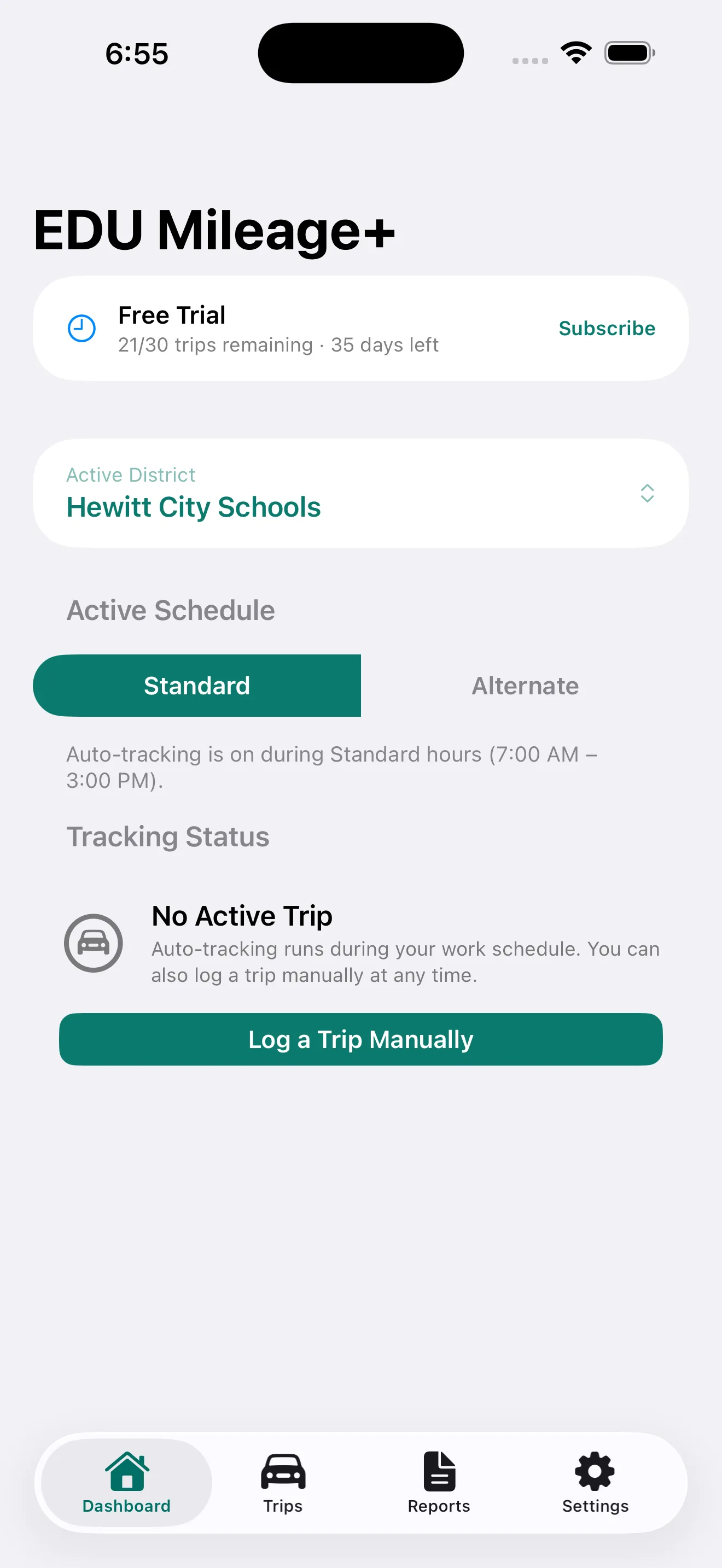
Drive between schools. The app does the rest.

District-aware

Built for how district reimbursement actually works.

Multiple districts, schedule-aware tracking, and district-approved distances per route. Trips outside your work hours are flagged for review. The IRS standard rate is built in, with per-district overrides if your employer reimburses differently.

  • Multi-district support with separate reports per district
  • District-approved mileage per route, not just GPS estimates
  • Out-of-schedule trips flagged for confirmation, not silently logged
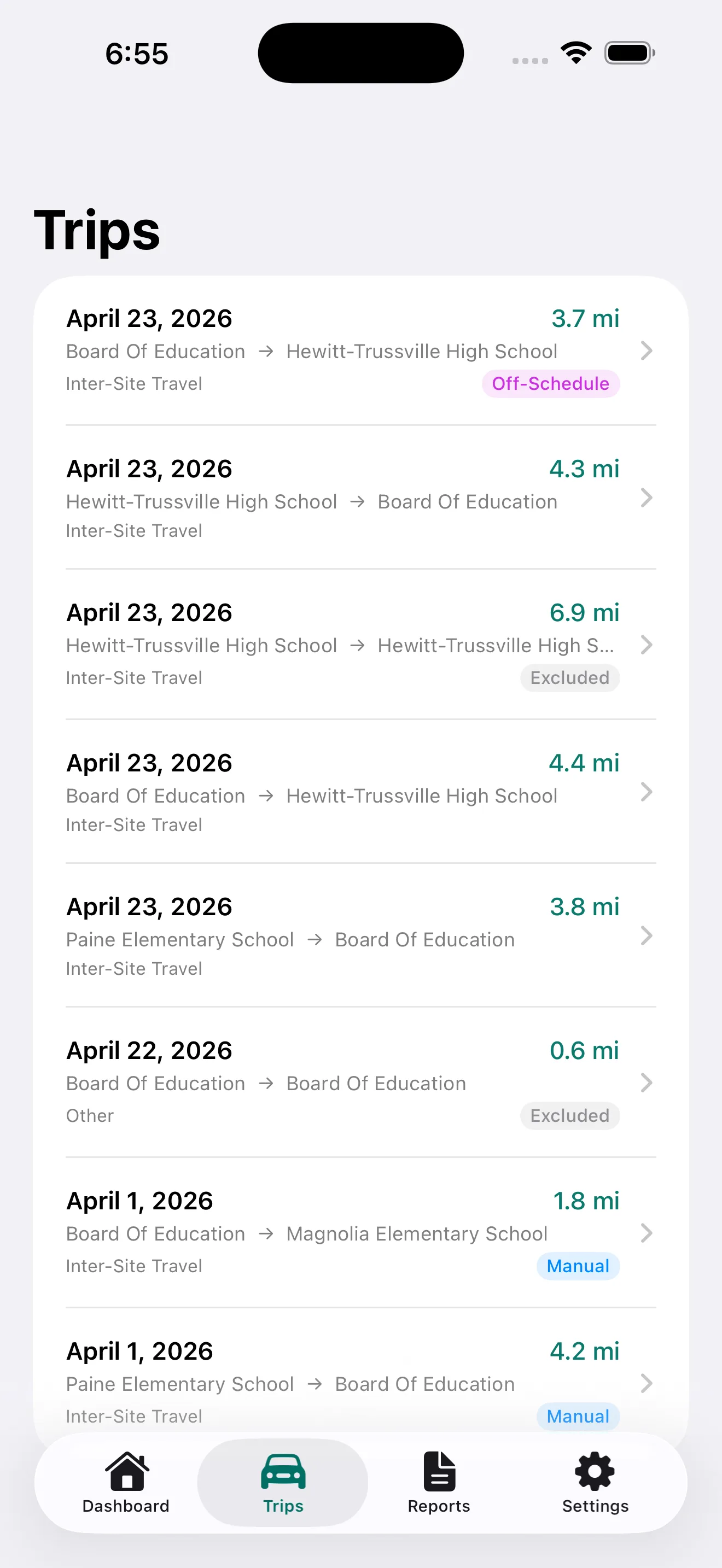
Built for how district reimbursement actually works.

Audit-ready

Reports that hold up under review.

Build a reimbursement report for any date range, review every trip, swipe to exclude, then approve. The IRS rate is locked at approval. Export to PDF (detailed or condensed), CSV, or generate a year-end IRS Annual Report covering every district.

  • PDF, CSV, and IRS Annual Report exports
  • Locked totals once a report is approved
  • GPS miles, approved miles, and unreimbursed miles tracked separately
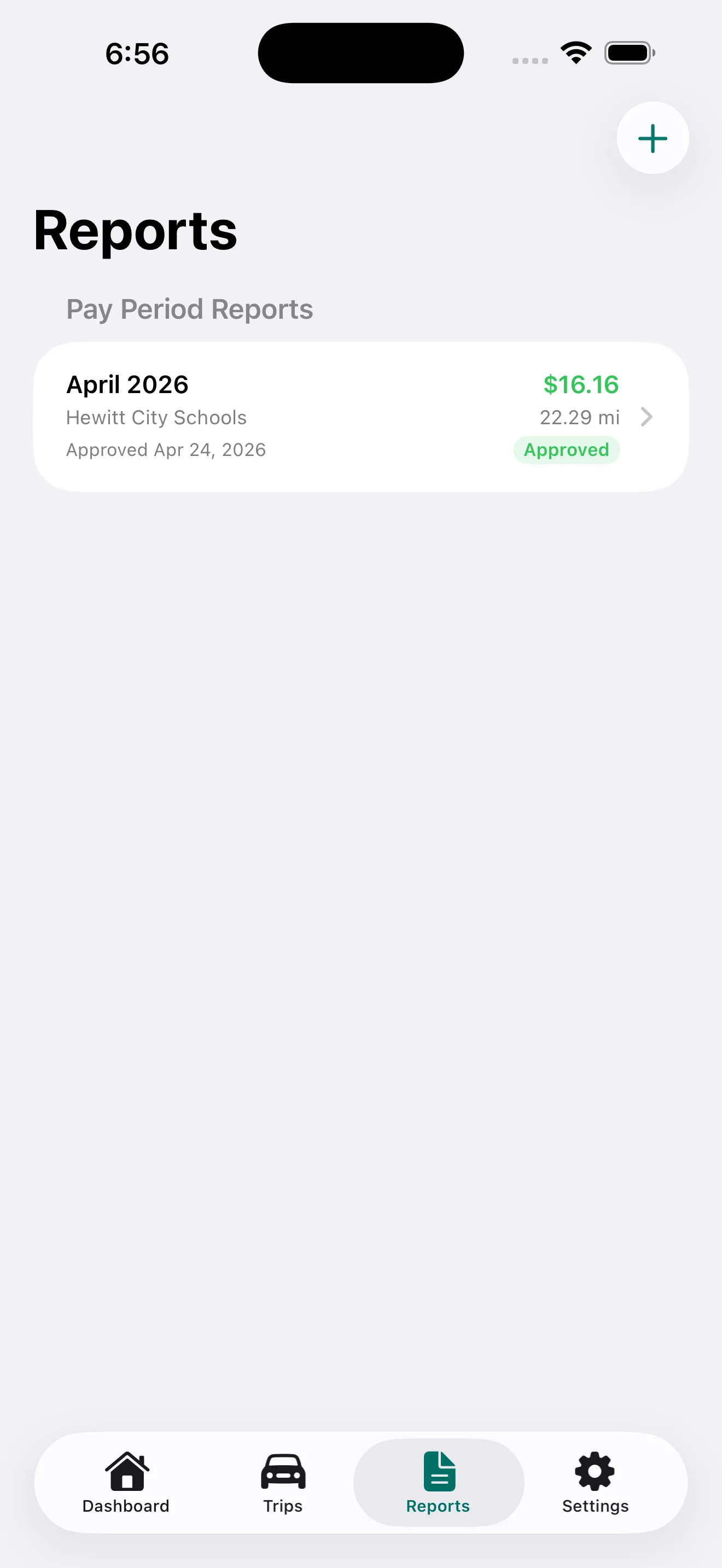
Reports that hold up under review.

How it works

Set it up once. Then forget about it.

Step 1: Add your district and sites

Tell EDU Mileage+ where you work. Add school sites by address, and calibrate the GPS exactly when you arrive in the parking lot for pinpoint accuracy.

Step 2: Drive your day

When your schedule says you're working, the app detects when you leave one site and arrive at another. Routes are recorded automatically. No buttons, no app to open.

Step 3: Approve and export

At the end of the period, build a report, review trips by day, exclude anything personal, and export to PDF or CSV. Submit to your district. Done.

Plus everything else

The details that turn a tracker into a tool you trust.

iCloud sync

Your data backs up automatically and restores on a new device. Private CloudKit container — no third-party servers.

Route maps on every trip

See the actual road you drove on a map in Trip Detail. GPS miles shown alongside Apple Maps reference distance.

Manual trip entry

Missed a drive? Log it after the fact with site picker, MKDirections auto-distance, and full purpose/notes fields.

Schedule-aware tracking

Standard and alternate work schedules per district. Tracking only runs during your hours; out-of-schedule trips are offered for review.

IRS Annual Report

Year-end cross-district summary with GPS, approved, and unreimbursed miles — useful for unreimbursed business expense tax filings.

Home Screen widget

Today's trip count and miles at a glance. Updates after every trip, rolls over at midnight.

Privacy-first

No analytics, no tracking, no ad networks. Your location data never leaves your device or your iCloud account.

Site sharing

Export your district's sites as a JSON file. Coworkers import to set up their app in minutes instead of hours.

Pricing

Simple, fair, and worth the first reimbursement check it captures.

Try free for 30 trips or 35 days, whichever comes first. No commitment, no upfront card required.

Monthly

Pay as you go.

$5.99 / month
Get notified at launch
  • One district included
  • Unlimited trips, automatic detection
  • PDF, CSV, and IRS Annual Reports
  • iCloud sync across your devices
  • Cancel anytime
Save 33%

Annual

Best value for full-year drivers.

$47.99 / year

Works out to $4.00/month.

Get notified at launch
  • Everything in Monthly
  • Two months free vs. monthly billing
  • One charge, no monthly statement clutter
Work across two school districts? Add a second district for $1.99 / month. Manage the add-on inside the app.

Frequently asked

Questions answered.

What does EDU Mileage+ actually do?
EDU Mileage+ tracks the miles you drive between your district's school sites and automatically builds reimbursement reports. When you leave one registered site and arrive at another, the app logs the trip — including the GPS-measured route — without any manual input. You can also log trips manually, review everything before approving a report, and export to PDF or CSV for submission.
How is this different from MileIQ or other mileage trackers?
EDU Mileage+ is built specifically for K-12 district reimbursement, not generic business mileage. That means multi-district support, district-specific approved distances per route, schedule-aware tracking that knows when you're on the clock, an IRS Annual Report formatted for tax filings, and exports that match what reimbursement forms actually need. Generic trackers can record trips, but they don't speak the language of district reimbursement.
Will my district accept the report I export?
Reports are exported as standard PDF or CSV with all the fields a typical reimbursement form requires: date, origin, destination, purpose, miles, mileage rate, and reimbursement amount, plus your name, job title, and district. The IRS Annual Report adds GPS, approved, and unreimbursed mile breakdowns for tax purposes. If your district uses a custom form, the CSV export gives you the source data to fill it out — and direct support for specific district reimbursement forms is on the roadmap for future versions.
I'm not a teacher — does this work for paras, coaches, support staff, or admins?
Yes. The app was built for anyone employed by a school district who drives between sites for work. Paraeducators, special-education staff, coaches splitting time across campuses, district office personnel, custodial supervisors, IT staff, transportation coordinators — the use case is the same: log every reimbursable mile automatically and export it cleanly.
How does the free trial work?
You get 30 trips and 35 days of full access from the moment you first install the app — whichever limit you hit first ends the trial. All features are available during the trial with no restrictions. You can subscribe at any time during or after the trial.
What does a subscription include?
A subscription includes one district with unlimited trips, automatic trip detection, report generation, and PDF/CSV export. Monthly and annual plans are available. The annual plan works out to about 33% less per month than monthly billing.
Why does the app need my location all the time?
Trip detection uses geofencing — iOS monitors invisible boundaries around each of your registered sites. When your device crosses one of those boundaries, the app wakes up and records the departure or arrival. This works even when the app is closed, but it requires Always location access. Without it, the app only knows your location when you have it open, which means most automatic trips would be missed.
Is my location data shared with anyone?
No. Your location data stays on your device and in your private iCloud account. EDU Mileage+ does not collect, transmit, or share your GPS data. iCloud sync uses Apple's private CloudKit container, which only you can access.
Does the app drain my battery?
Geofencing is designed by Apple to be very battery-efficient — iOS handles boundary detection at the system level using low-power hardware. Active GPS tracking only runs while you are driving between sites, and automatically switches to a lower-power mode when your device detects you have stopped. In practice, most users see no noticeable difference in daily battery life.
How does the app know when a trip starts and ends?
When you leave a registered site, iOS delivers a geofence exit event and the app begins recording. It tracks your route using GPS and accumulates miles as you drive. When you arrive at another registered site and remain there for at least 60 seconds, the app confirms the arrival and saves the completed trip. The 60-second wait prevents false trips from drive-bys.
What is the IRS Annual Report?
The IRS Annual Report is a cross-district summary of all your reimbursable trips for a full tax year. It shows GPS miles, approved miles, and any unreimbursed miles for each trip — useful for documenting unreimbursed business expenses on your tax return. It exports to PDF and CSV.
What is the District Add-On?
If you work across two school districts, the District Add-On unlocks full tracking and reporting for a second district — $1.99/month added to your base plan. Manage it inside the app under Settings → Subscription.
Is there a limit to how many sites I can have?
You can add as many sites as you like, but iOS limits each app to 20 active geofences at a time. EDU Mileage+ handles this automatically — it always keeps the 20 sites nearest to your current location active and updates the monitored set as you move.
What if a trip didn't get logged?
Use the Log a Trip Manually button on the Dashboard or the + button on the Trips tab. You can set the date, start and end sites, miles, purpose, and notes. The app can also auto-calculate the Apple Maps driving distance for the route.
How do I cancel my subscription?
Subscriptions are managed through Apple. Go to iOS Settings → your name → Subscriptions, find EDU Mileage+, and tap Cancel Subscription. Your access continues until the end of the current billing period.
How do I delete my account and all my data?
Open Settings → Delete Account in the app. After confirming, all your trips, reports, districts, sites, schedules, approved distances, trip descriptions, and profile information are permanently removed from this device and your iCloud account. The action cannot be undone. Note: deleting your account does not cancel an active subscription — manage that separately through iOS Settings → your name → Subscriptions.

More questions? Visit Support or email support@eduplusapps.com.

Ready to track every reimbursable mile?

EDU Mileage+ is now on the App Store. Free for 30 trips or 35 days — no credit card, no commitment.

Download on the App Store

Built for K-12 educators · Privacy-respecting · No analytics, no ads